


Make CI/CD process more efficient
In my previous post, I explained how to install ArgoCD Image Updater(AIU). Now, let’s leverage AIU to make CI/CD process more efficient by automating of update image tag! 🐙
- Preparation
- Create Application with Kustomize
- Configure ArgoCD Image Updater
- Test the new CI/CD pipeline
- Wrap up
Preparation
Please install tools below.
- kubernetes[1]
- ArgoCD[1]
- ArgoCD Image Updater [1]
- GitHub repository for manifests [2]
- DockerHub repository[3]
- App-of-Apps-pattern ArgoCD Application.[4]
[1] Here are my versions of each tool for reference.
$ minikube profile list
|----------|-----------|---------|--------------|------|---------|---------|-------|--------|
| Profile  | VM Driver | Runtime |      IP      | Port | Version | Status  | Nodes | Active |
|----------|-----------|---------|--------------|------|---------|---------|-------|--------|
| minikube | docker    | docker  | 192.168.49.2 | 8443 | v1.26.3 | Running |     1 | *      |
|----------|-----------|---------|--------------|------|---------|---------|-------|--------|

$ argocd version --short | grep argocd-server
argocd-server: v2.7.4+a33baa3.dirty

$ argocd-image-updater version
argocd-image-updater: v0.12.2+1aa317c
[2] Please refer to my post and create a GitHub repository for manifests. I will use yukinakanaka/my-manifests.
[3] Please refer to my post and create a DockerHub repository. I will use yukinakanaka/my-api.
[4] If you’re not familiar with App of Apps pattern, please check the ArgoCD document or my post.
Create Application with Kustomize
AIU can update images of Application that are managed by Argo CD and are either generated from Helm or Kustomize tooling. So, let’s create Application using Kustomize.

Create a manifest of Deployment
Let’s create a manifest of Deployment in my-manifests repository.
Please created my-api-app-kustomize directory at the top directory of my-manifests.
cd my-manifests
mkdir my-api-app-kustomize
Store the following in a file called my-api-deploy-kustomize.yaml, and put it under my-api-app-kustomize directory. Please put your DockerHub Repository name in the image field.
apiVersion: apps/v1
kind: Deployment
metadata:
  labels:
    app: my-api-kustomize
  name: my-api-kustomize
spec:
  replicas: 1
  selector:
    matchLabels:
      app: my-api-kustomize
  template:
    metadata:
      labels:
        app: my-api-kustomize
    spec:
      containers:
      - image: <YOUR DOCKERHUB REPOSITORY NAME>
        name: my-api-kustomize
        resources:
          requests:
            cpu: 200m
            memory: 200Mi
          limits:
            cpu: 200m
            memory: 200Mi
Create kustomization.yaml
Store the following in a file called kustomization.yaml and put it under my-api-app-kustomize directory. Please put your DockerHub Repository name in the image field.
apiVersion: kustomize.config.k8s.io/v1beta1
kind: Kustomization
resources:
- my-api-deploy-kustomize.yaml
images:
- name: <YOUR DOCKERHUB REPOSITORY NAME>
  newTag: <YOUR IMAGE'S LATEST TAG>
Create a manifest for Application
Let’s create Application called my-api-app-kustomize with App of Apps pattern approach by adding a new manifest at GitHub repository for manifests called my-manifests.
Store the following in a file called my-api-app-kustomize.yaml, and put it under argocd-resources/applications/applications directory. Please put your repository’s URL in the repoURL field.
apiVersion: argoproj.io/v1alpha1
kind: Application
metadata:
  name: my-api-app-kustomize
spec:
  destination:
    namespace: default
    server: 'https://kubernetes.default.svc'
  source:
    path: my-api-app-kustomize
    repoURL: '<YOUR REPOSITORY URL>'
    targetRevision: HEAD
  sources: []
  project: default
  syncPolicy:
    automated:
      prune: false
      selfHeal: false
Push manifests to the GitHub repository
Commit and Push manifests to the repository called my-manifests. .
git add argocd-resources/applications/my-api-app-kustomize.yaml \
&& git add my-api-app-kustomize/kustomization.yaml \
&& git add my-api-app-kustomize/my-api-deploy-kustomize.yaml \
&& git commit -m "Add my-api-app-kustomize" \
&& git push
If anything is unclear, please refer to my commit.
Check ArgoCD
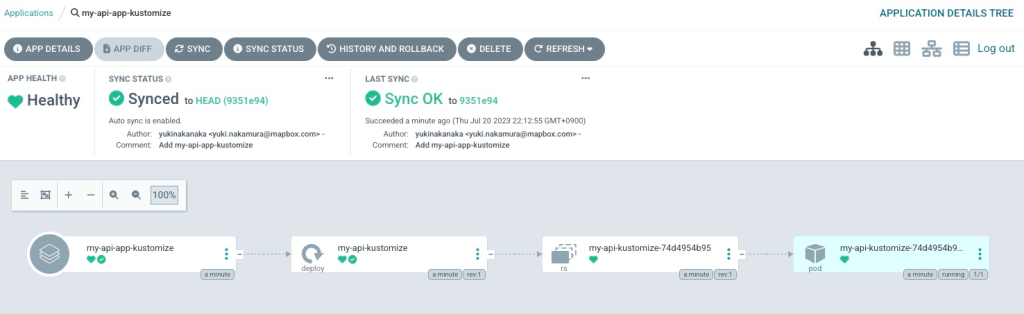
Access ArgoCD and check my-api-app-kustomize. You can see a pod is running!

Configure ArgoCD Image Updater
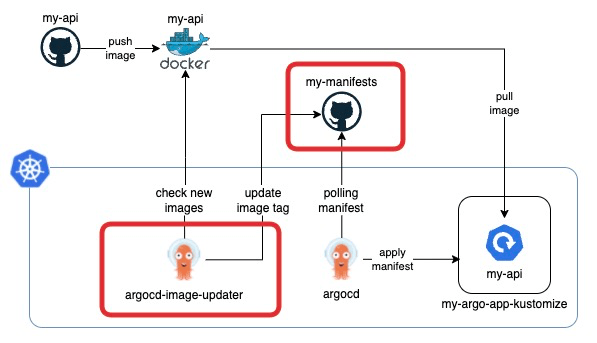
Set annotations for ArgoCD Image Updater’s on Application
We can control AIU’s behaviors by annotating ArgoCD Application. Please add annotations to your my-api-app-kustomize.yaml like below. If anything is unclear, please refer to my manifest.
apiVersion: argoproj.io/v1alpha1
kind: Application
metadata:
  name: my-api-app-kustomize
  annotations:
    argocd-image-updater.argoproj.io/image-list: my-image=<YOUR DOCKERHUB REPOSITORY NAME>
    argocd-image-updater.argoproj.io/write-back-method: git
    argocd-image-updater.argoproj.io/git-branch: main
    argocd-image-updater.argoproj.io/write-back-target: kustomization
    argocd-image-updater.argoproj.io/my-image.update-strategy: latest
spec:
  destination:
    namespace: default
    server: 'https://kubernetes.default.svc'
  source:
    path: my-api-app-kustomize
    repoURL: '<YOUR REPOSITORY URL>'
    targetRevision: HEAD
  sources: []
  project: default
  syncPolicy:
    automated:
      prune: false
      selfHeal: false
Let me explain the meaning of the annotations.
Target images
argocd-image-updater.argoproj.io/image-list: my-image=<YOUR DOCKERHUB REPOSITORY NAME>
This annotation holds a list of image names that should be updated. Here my-image is alias of image and it is used in strategies’ configuration.
Update methods
argocd-image-updater.argoproj.io/git-branch: main
argocd-image-updater.argoproj.io/write-back-method: git
AIU supports two methods to propagate new versions of the images to Argo CD. One is argocd, the other is git. If you choose git, AIU will create a Git commit in your manifests’ Git repository against a branch that is specified in the annotation named argocd-image-updater.argoproj.io/git-branch. If you choose argocd, AIU directly modifies the ArgoCD Application resource via Kubernetes API or ArgoCD API.
I prefer git because it follows GitOps principle!
argocd-image-updater.argoproj.io/write-back-target: kustomization
By default, git write-back will create or update .argocd-source-.yaml. If you are using Kustomize and want the image updates available for normal use with kustomize, you may set the write-back-target to kustomization. This method commits changes to the Kustomization file back to git as though you ran kustomize edit set image.
Update strategies
argocd-image-updater.argoproj.io/my-image.update-strategy: latest
AIU supports four strategies(semver, latest, digest, name) now. I prefer latest because it’s simpler than others.
Commit and Push to manifests repository
Let’s set annotations by updating the manifest.
git add argocd-resources/applications/my-api-app-kustomize.yaml \
&& git commit -m "Add ArgoCD Image Updater's annotation on my-api-app-kustomize" \
&& git push
Check ArgoCD Image Updater’s log
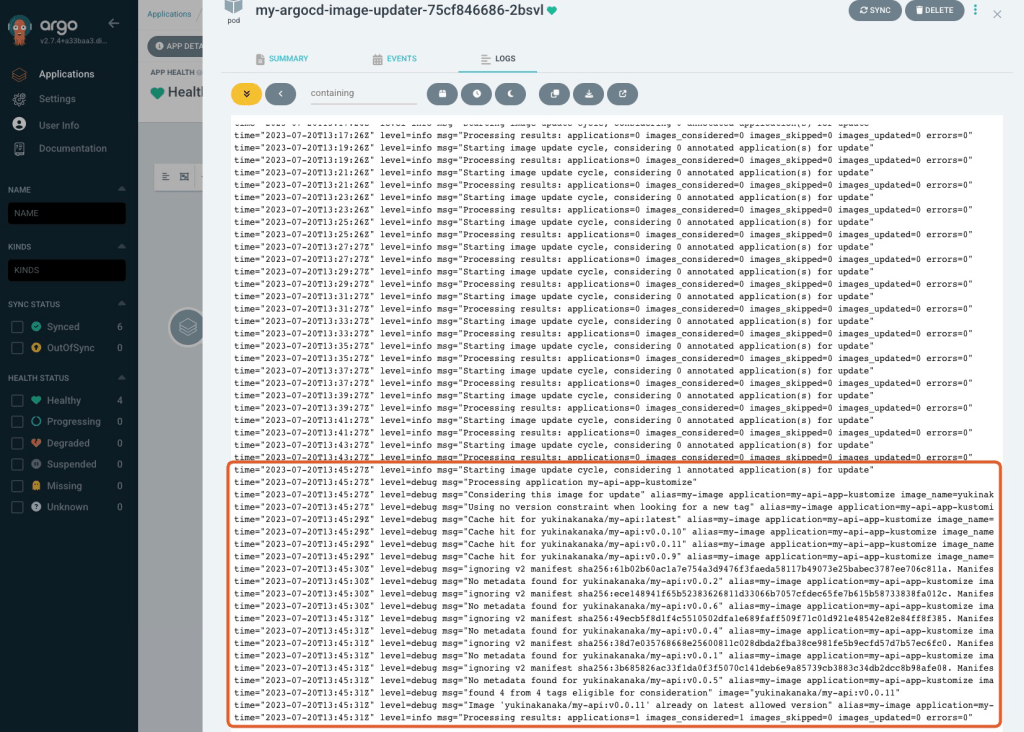
Please check ArgoCD Image Updater’s log. It’s OK if you can see a log like below.
level=info msg="Starting image update cycle, considering 1 annotated application(s) for update"
Notes:
- You can change interval for checking images by –interval option. Default value is 2 minutes.
- You can change loglevel by –loglevel option. Default value is info.
Test the new CI/CD pipeline
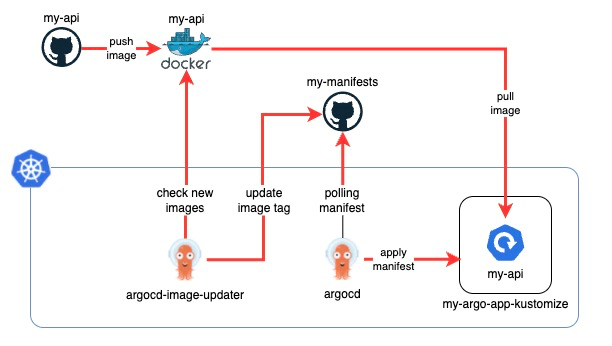
Now, we set up a new CI/CD pipeline, so let’s test it!
Build and Push a new image to DockerHub
Let’s start building and pushing a new image to DockerHub repository. I’ve set up GitHub Action, so I will use it.
Trigger GitHub Action by creating release.

Check if GitHub Action has run.

Check there is a new image on DockerHub.

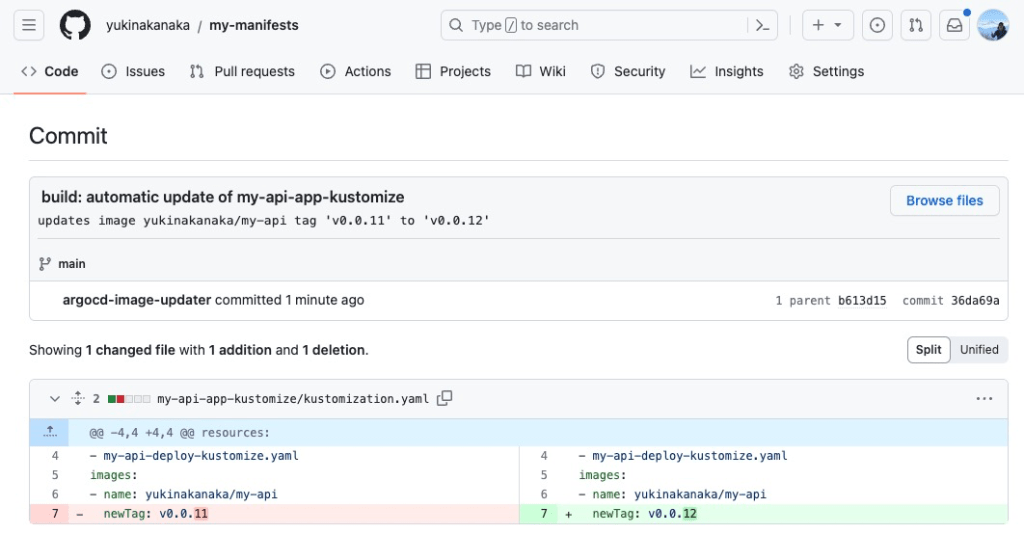
Check if there is a new commit by ArgoCD Image Updater
ArgoCD Image Updater should detect a new image on DockerHub and create a commit that updates kustomization.yaml ! Please check your manifests’ GitHub repository. Here is my commit.
Check if a new image is deployed
ArgoCD should get a new manifest and sync! Please check if a new image is deployed.

Wrap up
We automate a deploy a new image using ArgoCD Image Updater and ArgoCD. Thanks to ArgoCD Image updater, you don’t have to change image’s tag manually any more!
Thank you for reading! 🐙

 Yuki Nakamura's Blog