

TL;DR
In this post, I’ll walk you through an example of an eBPF Kprobe program using Aya with Rust. 🦀🐝
- Introduction: Kprobes
- Run eBPF Kprobe tracing program
- Check eBPF Program in the Kernel
- Argument Handling in Kprobes
- References
- Wrap up
Introduction: Kprobes
Kprobe (Kernel Probe) is a debugging and tracing mechanism for the Linux kernel. BPF programs can now be used with Kprobes. When writing a BPF program for a Kprobe, you can choose to run it:
- At the start of a function call. (kprobes)
- When a function call finishes (kretprobes)
This combination of Kprobes and BPF provides a powerful way to analyze kernel behavior. However, it’s important to remember:
- Kprobes are not guaranteed to work the same way across different kernel versions
- You need to make sure your BPF programs are compatible with the specific kernel versions you’re using
Run eBPF Kprobe tracing program
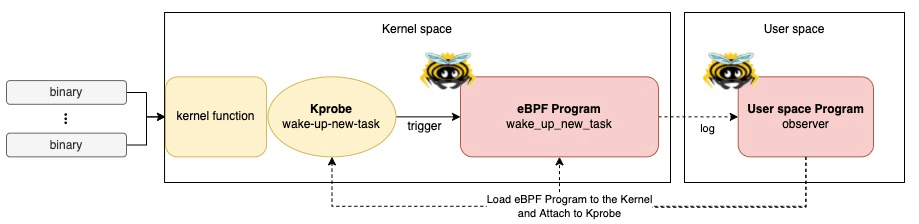
Let’s run an eBPF Kprobe tracing program on your machine!
Prerequisites
- Linux
- Rust nightly
- bpf-linker
- bindgen-cli
- bpftool
- (Optional) bpftop
(Optional) Set up environment on MacOS
If you’re using MacOS, you can quickly set it up with lima and my template.
- Install lima
brew install lima
- Download the template
wget https://raw.githubusercontent.com/yukinakanaka/aya-lab/main/lima-vm/aya-lab.yaml
- Edit cpu and memory configuration in
aya-lab.yaml. Default values are:
cpus: 4
memory: "8GiB"
- Create a VM
limactl start lima-vm/aya-lab.yaml
Check available Kprobes
List all available Kprobe on your kernel:
sudo cat /sys/kernel/debug/tracing/available_filter_functions
Make sure the wake_up_new_task kprobe is available:
grep wake_up_new_task /sys/kernel/debug/tracing/available_filter_functions
wake_up_new_task
Clone the Repository
Get all the codes from my repository.
git clone https://github.com/yukinakanaka/aya-lab.git
cd aya-lab/kprobe-wake-up-new-task
Generate Structs codes
Run the next command to generate the necessary struct codes:
cargo xtask codegen
Build
cargo xtask build
Run
sudo ./target/debug/observer
Test
While keeping the eBPF program running, open another shell. In the new terminal, follow these steps:
1. Check the shell’s Process ID (PID), which is also its Thread Group ID (TGID)
echo $$
2. Run the sleep command:
date &
Observe the output in the original terminal where the eBPF program is running. You should see a log the new shell calls wake-up-new-task to run sleep!
You should see logs from the eBPF program showing information extracted from the Kprobe!
- Example:
# commands in new shell
$ echo $$
21479
$ date &
[1] 22367
$ Sat Sep 14 17:16:13 JST 2024

# ebpf lprogram log
2024-09-14T08:16:13.392816Z  INFO kprobe_wake_up_new_task: wake_up_new_task. caller: 21479, comm: bash), tgid: 22367, tid: 22367.
Check eBPF Program in the Kernel
While you’re running the eBPF program, let’s check eBPF Program in your Kernel!
Check with bpftool
You can see the eBPF Program loaded into the kernel:
sudo bpftool prog list name wake_up_new_tas
Example output:
sudo bpftool prog list name wake_up_new_tas

121: kprobe  name wake_up_new_tas  tag 9476d41f042db382  gpl run_time_ns 202208 run_cnt 12
        loaded_at 2024-09-14T17:18:47+0900  uid 0
        xlated 6856B  jited 6288B  memlock 8192B  map_ids 50,52,53,51
        pids observer(22448)
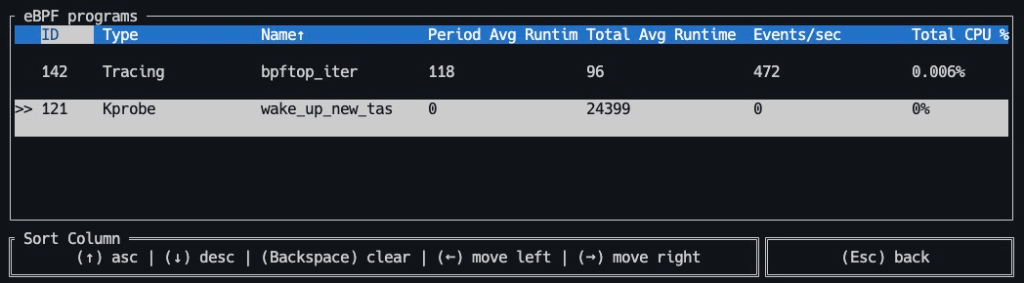
(Optional) Check with bpftop
bpfhttps://github.com/Netflix/bpftoptop provides a dynamic real-time view of running eBPF programs. You can check wake_up_new_tas is running by:
sudo bpftop
Argument Handling in Kprobes
Handling arguments is crucial in eBPF Kprobe program. So, let me explain about it. The program gets Kprobe arguments easily by:
let task: *const task_struct = ctx.arg(0).ok_or(1)?;
How to Identify Argument Types
To decide the number and types of arguments, you need to inspect the kernel code. The spec of wake_up_new_task is defined here.
/*
 * wake_up_new_task - wake up a newly created task for the first time.
 *
 * This function will do some initial scheduler statistics housekeeping
 * that must be done for every newly created context, then puts the task
 * on the runqueue and wakes it.
 */
void wake_up_new_task(struct task_struct *p)
This indicates that the kprobe wake_up_new_task takes one argument: a pointer to a task_struct.
If you’d like to know other Kprobe’s arguments, please check kernel codes in /include/trace/events at GitHub or Bootlin. If you want to specify the kernel version, Bootlin is a good choice.

Generate Struct Codes by aya-tool
The first argument is deserialized as a task_struct pointer. How can we know this data types struct?
Linux has the /sys/kernel/btf/vmlinux, that contains a description of all internal kernel type. The aya-tool can generate Rust struct codes using it. When we run cargo xtask codegen, xtask/src/codegen.rs generates Rust Codes in ebpf/src/bindings.rs.
Read values from task_struct
You can read values from argument using the bpf_probe_read_kernel function as follows.
let comm = bpf_probe_read(&(*task).comm as *const [::aya_ebpf::cty::c_char; 16usize])?;
let tgid = bpf_probe_read(&(*task).tgid as *const pid_t)?;
let tid = bpf_probe_read(&(*task).pid as *const pid_t)?;
References
- Writing eBPF Tracepoint Program with Rust Aya: Tips and Example
- Writing eBPF RawTracepoint Program with Rust Aya
- Aya Community’s discord
- How to write an eBPF/XDP load-balancer in Rust
- aya-examples
Wrap up
In this post, I demonstrated how to create an eBPF Kprobe program using Aya and Rust. I covered key aspects like argument handling. I hope this guide helps you in your eBPF programming journey! 🦀🐝

 Yuki Nakamura's Blog